
If you’ve ever wondered whether to use virtual machines or containers for your applications, you’re not alone. In today’s cloud-native world, virtualization and containerization are two of the most important technologies powering modern infrastructure.
But while they may seem similar, they operate in fundamentally different ways.
This guide breaks down how each works, their strengths, weaknesses, and when you should use one over the other.
What Is Virtualization?
Hardware-Level Isolation Explained
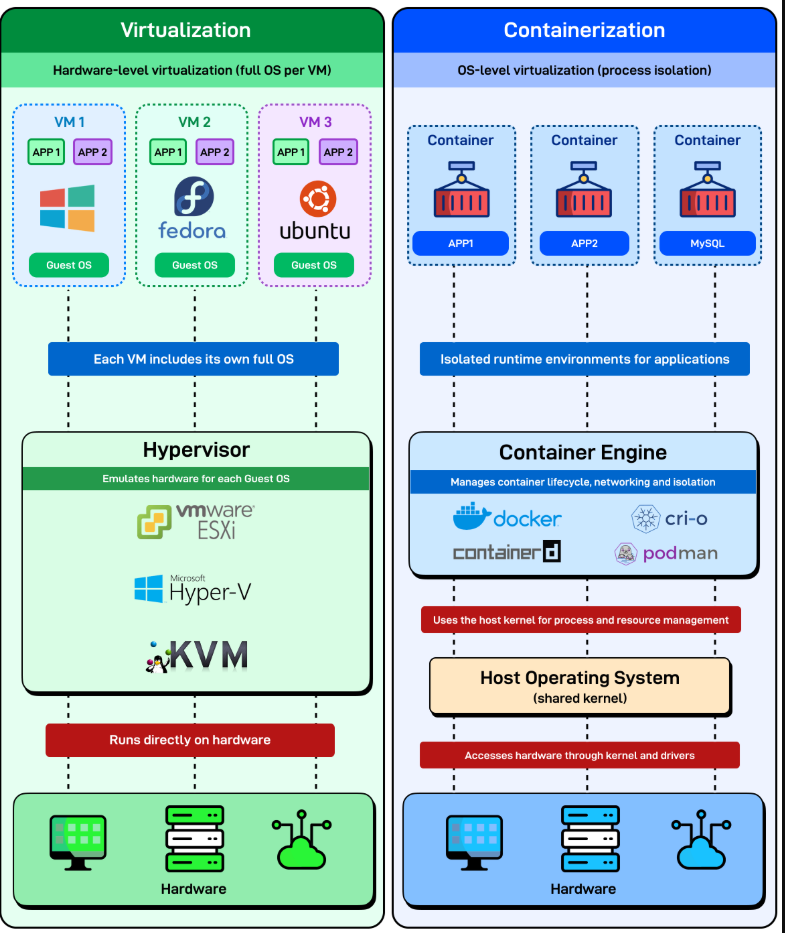
Virtualization allows one physical server to run multiple independent operating systems. Each environment is called a Virtual Machine (VM), and it behaves like a full computer.
Popular hypervisors include:
How Virtualization Works
A hypervisor sits directly on top of your hardware and emulates everything a computer needs:
- Kernel
- Drivers
- System libraries
- Full OS (Windows, Fedora, Ubuntu, etc.)
Each VM is completely self-contained, making virtualization extremely secure but also resource-heavy.
Benefits of Virtualization
- Strong isolation — Each VM behaves like a standalone system
- Run multiple OSes on the same machine (Windows + Linux)
- Great for legacy applications that require a full operating system
- Stable and predictable performance
Drawbacks of Virtualization
- Resource-heavy — Every VM includes its own OS
- Slower startup time — Booting a full OS takes minutes
- Higher storage and memory usage
What Is Containerization?
OS-Level Isolation Explained
Containerization isolates your applications at the process level, not the hardware level. Instead of running a full OS per environment, containers share the host machine’s kernel.
Popular container engines include:
How Containerization Works
A container bundles:
- App code
- Dependencies
- Libraries
- Runtime
But it does not include an operating system.
The container engine handles isolation, networking, and execution — all on top of a shared OS kernel.
This makes containers extremely lightweight.
Benefits of Containerization
- Starts in milliseconds — Because you’re just launching a process
- Lightweight and efficient — Minimal CPU, RAM, and storage
- Perfect for microservices and DevOps pipelines
- Easy to scale horizontally
Drawbacks of Containerization
- Cannot mix OS kernels — Windows containers won’t run on a Linux host
- Less isolation than full VMs
- Requires kernel compatibility across all containers
Virtualization vs. Containerization: Key Differences
| Feature | Virtualization | Containerization |
| Isolation level | Hardware-level | OS-level |
| OS per environment | Yes | No |
| Startup time | Minutes | Milliseconds |
| Resource usage | High | Very low |
| Cross-OS support | Yes | No |
| Best use case | Legacy apps, multi-OS setups | Cloud-native apps, microservices |
When Should You Use Virtual Machines?
Choose VMs if you need:
✔ To run multiple operating systems
✔ Strong isolation for security or compliance
✔ Legacy applications that require full OS environments
✔ Stable, predictable infrastructure for long-running workloads
When Should You Use Containers?
Choose containers if you need:
✔ Fast deployments
✔ Lightweight microservices
✔ Rapid scaling
✔ DevOps automation
✔ Cloud-native architecture
Final Thoughts
Virtualization and containerization aren’t enemies—they complement each other.
VMs provide robust, hardware-level isolation, while containers offer speed and efficiency for modern applications.
In practice, many companies run containers inside virtual machines to get the best of both worlds.
